StopWarden

Your strategy runs unattended. If it leaves a trade without a stop, StopWarden attempts to close it.

You’re asleep, at work or driving when the entry fills and the stop never goes in. StopWarden, an add-on for NinjaTrader 8, is watching. It gives your strategy a short wait to place its own stop. If none appears, Protect, its paid mode, attempts to close the position and to cancel the orders left behind. It works while your PC is on, signed in and unlocked; the limits are listed below.

  • Watch, free: the Safety Scan of your last 30 days, then alerts. It sends no orders on its own.
  • Your trades and orders are never sent to us. Alerts go only to the Telegram chat or Discord webhook you set up.
  • Protect, in Standard at $49 a month, acts only on the one account you configure, unless you turn on the optional global cancel setting (NinjaTrader’s cancel-all, which reaches every account). How you switch it on

Needs Windows 10 or 11 and NinjaTrader 8.1; one PowerShell command, then one compile (F5) in NinjaTrader, and the NinjaTrader settings. Every step

StopWarden Sim101 · real recording · no sound
That’s a real screen recording, made on Sim101, NinjaTrader’s practice account. StopWarden is in Watch, the free mode: it finds a position with no stop, outlines the line and raises the alert. Recorded 30 September before the final build; one setting in the alert lines is blanked out. See all 20 seconds

Still no stop after the wait?
Protect attempts to close the position. You do not have to be at the screen while the PC is on, signed in and unlocked, and NinjaTrader is running. The limits are listed below. Protect gives your strategy a short wait to place its own stop, then sends NinjaTrader’s own Close Position command and attempts to cancel the orders left behind. If it cannot confirm the position is flat, it alerts you.

Attempts to close the position

An entry fills and no stop follows. Protect waits a short while, sends NinjaTrader’s own Close Position command, then checks the account is flat. If the close does not confirm, it tries again, 3 attempts in all, then alerts you.

Entry filled, no stop
position left open
Close Position sent
after the wait
Account checked flat
in NinjaTrader’s log; if it is not, Protect tries again

The rule Protect follows once you switch it on.
Leftover order cancelled

In a test, we placed a buy limit order on Sim101 with no strategy behind it. Left alone, an order like that can fill hours later, with no stop. Protect’s leftover-order guard cancelled it in that test.

Left working
Buy 1 limit
Cancelled
05:34:56

30 September 2026, Sim101: a test order we placed, with the guard switched on. The guard cancelled it at 05:34:56; StopWarden’s Activity tab logged it at 05:37:23, when StopWarden’s background program next started.

See the log line

2026-09-30 05:37:23 CRITICAL Order guard: CANCELLED 1 orphan working order(s) on unmanaged account Sim101 (0 protective stop(s) on an open position spared, 0 orphan(s) still inside grace): [14295c5bd39a4fd5bb99b8fbcc1172f2 '' Buy 1 Limit Working]

The long code is NinjaTrader’s order ID. “Orphan” is the log’s word for a leftover order.

If the close does not confirm, Protect sends Close Position again, with a screen click if NinjaTrader’s order interface does not answer, 3 attempts in all, then alerts you that a person is needed. It acts only on the one account you configure (unless you turn on the optional global cancel setting, which reaches every account), and never opens a position or places an entry order.

The whole recording, 20 seconds. The same real recording on Sim101, NinjaTrader’s practice account: a position with no stop, then StopWarden’s alert.

StopWarden recording Sim101 · Watch mode · 30 September 2026 0:20 · no sound

The outlined alert, as text2026-09-30 02:26:21 CRITICAL Watch mode: Sim101 has a position with no stop (+1 MNQ DEC26, …). Protect would have closed it (…

What you’re watching: a strategy on Sim101 holds 1 contract with no stop. StopWarden is in Watch, the free mode, so it raises the alert and says what Protect would have done; it does not close the position. 20 seconds, no sound, captions added. The older lines above the alert come from earlier runs that night. Recorded before the final build; one setting in the alert lines is blanked out.

What else breaks while you’re away. Protect attempts each fix. Free Watch alerts on some and the Scan reports others afterwards. NinjaTrader on its own does not do these for you unless you have set it up.

Four things that go wrong while a strategy runs unattended, and what Protect, Watch and NinjaTrader on its own each do
What goes wrongProtect paidWatch freeNinjaTrader alone
A position is left with no stopThe strategy never sent one, or the broker rejected it. Attempts to close itafter a short wait for your strategy’s own stop, and attempts to cancel that instrument’s working orders Alertsays Protect would have closed it No alert to your phone
Orders stay working after the strategy is switched off Attempts to cancel themafter a short grace period once the strategy has stopped; a stop still covering an open position is left in place Scan reports itafterwards, not as a live alert Only if you set itNinjaTrader’s cancel-on-disable settings; with them off, the orders keep working and can fill hours later, with no stop
The connection drops, or NinjaTrader crashes Attempts to bring it backin your trading window: starts NinjaTrader and signs in if it is down, reconnects, and turns the strategy back on only when no position is open Alertif a position is open No alert to your phonethe strategy may be switched off
The trading day ends, or you need everything stopped now Attempts to close outat your end time: switches the strategy off, attempts to close the position and to cancel the orders it has seen, and checks the account is flat. The same on your command, or if the balance falls below a floor you set. The balance floor is optional and off by default; it reads NinjaTrader’s Accounts grid about every 5 minutes, so a fast move can pass it. End-of-day alertif the strategy ran or a position is held; it closes nothing. On your command it only switches the strategy off. Only at the session endExit on session close, on by default, closes a strategy’s position then

Every action Protect can take, and when

The kind of failure it is built for. 4 September 2026, a prop-firm evaluation account: two closing orders for one position left the account short, with no stop.

  1. Long 1, stop working

    The strategy buys 1 contract. Its stop goes in with it.

  2. Long 1, strategy shut down

    It tries to move the stop. The broker rejects the change, and NinjaTrader shuts the strategy down.

  3. Short 1, no stop

    Two closing orders fire for one position: the strategy’s exit sells 1, then NinjaTrader’s own close sells 1 more. Nobody chose that trade.

  4. Flat

    A watchdog buys 1 to close it, 8 seconds later.

This one was closed by a separate watchdog script, 8 seconds later, not by StopWarden.

NinjaTrader’s log, 6 lines
  1. Order='…' New state='Filled' … Action='Buy' Quantity=1

  2. Name='ST_T1' New state='Working' Action='Sell' Stop price=29603.25 Type='Stop Market'

  3. Name='ST_T1' New state='Working' … Error='Unable to change order' Native error='InvalidPrice'

  4. Name='TEARDOWN_FLAT' New state='Filled' Action='Sell' Quantity=1 … Market position=Flat

  5. Name='StopCancelClose' New state='Filled' Action='Sell' Quantity=1 … Market position=Short

  6. Name='Close' New state='Filled' Action='Buy to cover' Quantity=1 … Market position=Flat

Shortened (… marks a cut), with the account, contract and strategy names removed. The same failure came back at 13:10 that day, with 2 contracts. Run afterwards over this log, StopWarden’s checks read the short as a position with no stop. The incident is kept as a permanent test in its code.

It won’t touch an order until you switch Protect on. Watch first, free. Then about 20 trades while it learns how your strategy places its stops. Then you decide.

  1. Watch free, from day one

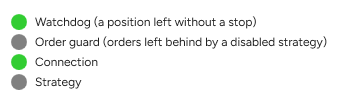
    StopWarden’s Status tab: lamps for Watchdog (a position left without a stop) and Connection lit green; Order guard and Strategy grey. Engine running (status 4 s old). Watch mode: alerts only. StopWarden will not place, cancel or close anything.

    Run the free Safety Scan of your last 30 days. Then Watch alerts you in StopWarden’s window inside NinjaTrader, and sends no orders on its own.

    What the Scan reports
  2. Learn about 20 trades

    Learn report: not accepted yet (needs 20 trades over 5 sessions).

    While Watch runs, StopWarden measures how your strategy places its stops. The Learn report shows what it found; you read it and accept it.

  3. Protect in Standard, you switch it on

    • Attempts to close a position left with no stop
    • Attempts to cancel orders left working
    • Attempts to reconnect, and turns the strategy back on only when flat
    • Shuts down at your end of day, or on your command

    Only on the one account you configure. If a close does not confirm, it tries again, 3 attempts in all, then alerts you.

    Every action it can take

What it catches, and what it can’t. A plain list of both.

It catches

  • Orders left working after a switch-off
  • Positions left with no stop

It can’t catch

  • Trades placed by hand that NinjaTrader never logged
  • An ordinary losing streak, with stops in place
  • A fast news spike that fills a stop far past its price
  • A market gap through a stop that is working

Check it yourself: the rule the Scan uses the build’s SHA-256 a real incident, with NinjaTrader’s log

Alerts only in this version: ATM strategies (NinjaTrader’s Advanced Trade Management brackets), strategies that exit without a resting stop, strategies whose own stop is not reliably working inside the wait, and an account you also trade by hand and tell StopWarden so. Protect attempts each action, confirms it from NinjaTrader’s log, and tells you when it could not.

StopWarden is built by a trader who has run automated strategies unattended on prop accounts. Had a strategy do something you never asked it to? Tell me what happened: support@stopwarden.com

Sean Goffigan, who builds StopWarden

Free shows you what it would have done. Standard includes Protect: StopWarden attempts to close the position.

  • Free

    See what it would have done

    $0

    no card, no time limit

    The Safety Scan, Watch alerts and the Learn report, for one strategy on one account.

  • Standard

    StopWarden attempts to close the position

    $49/month

    after a 7-day free trial

    Everything in Free, plus Protect: it attempts to close a position left without a stop, to cancel leftover orders and to restart NinjaTrader. One strategy on one account.

  • Pro waitlist

    For several prop accounts

    $99/month

    planned price, not open yet

    Protect on up to 5 strategy-account pairs and a drawdown and daily-loss guard (being built). Join the waitlist

  • Team waitlist

    Up to 5 PCs

    $199/month

    planned price, not open yet

    Up to 20 strategy-account pairs on up to 5 PCs. Join the waitlist

  • Free trial: 7 days on every paid plan, card required. $0 today; cancel before day 7 and you pay nothing, and the first charge has a 14-day refund. Protect unlocks after the Learn report, so the first days of a trial run in Watch.
  • Checkout, billing and cancelling run through Whop, a payments platform.

Questions

What are Watch, Protect and Learn?

Watch is the free mode: it reads NinjaTrader’s log and alerts you, and sends no orders on its own. Protect is the paid mode: it attempts to close a position left without a stop and to cancel orphan (leftover) orders. Learn is the report that measures how your strategy places its stops; you read it and accept it before Protect can switch on. “Naked” in the docs means a position with no working stop.

Could Protect close a trade my strategy was about to protect?

It can. Protect attempts to close a position only when your strategy’s stop has not covered it for the whole wait, or when stops were missing for that long in total within one minute (a stop that keeps disappearing and coming back). Before Protect switches on, the Learn report times your own strategy’s stops. If any took too long, or the gaps add up, Protect stays off for that strategy and Watch keeps alerting.

Could Protect close a position twice, or turn it into the opposite position?

It is built to avoid that. Just before it sends a close, Protect reads NinjaTrader’s log again and re-judges the position. If a stop has arrived, or the position has ended or reversed since it was judged, it sends nothing and judges again on its next pass. If the position is still on the same side and still has no stop, it closes the size it finds at that moment. If the position is still not flat afterwards, it tries again, 3 attempts in all, then alerts you that a person is needed. This reduces the chance of a second close. It works from what NinjaTrader’s log shows at that moment, and it is not a guarantee.

What do I get on day one of a paid plan?

Watch alerts and your licence key. Protect stays off until the Learn report is complete (about 20 trades over 5 sessions) and you accept it. Then you switch Protect on.

Where do alerts appear?

In the StopWarden window inside NinjaTrader, on its Activity tab, newest first. Alerts can also go to a Telegram chat or a Discord webhook that you set up. Each alert says what happened and what Protect would have done. If something has to happen while nobody is at the screen, that is Protect’s job.

Can I use it on a prop firm account?

That depends on your firm, and firms change their rules, so read yours before you use any tool. We read the firm’s own page for Lucid, FundedNext Futures, MyFundedFutures, Tradeify and TradeDay on 24 September 2026 (re-read for four of five on 6 October 2026). Lucid and FundedNext Futures permit automated trading; MyFundedFutures’ page permits automated strategies, though other write-ups describe stricter conditions; Tradeify permits it if you can prove you are the sole owner of the bot; TradeDay forbids algos and bots purchased from a third party. For Bulenox, Apex and TakeProfitTrader we have only secondhand reports, not the firm’s page: Bulenox is reported to permit automated tools, and Apex and TakeProfitTrader are reported to prohibit automation. The rules, firm by firm

What do I install, and what leaves my PC?

A StopWarden window inside NinjaTrader (an AddOn you compile once with F5) and a background program that reads NinjaTrader’s log. It does not change your strategy’s code or settings; in Protect, the only thing it touches on a strategy is the Enable box on its Strategies-tab row, to switch it off or on. Your trades and orders are never sent to us. Alerts go only to the Telegram chat or Discord webhook you set up, and they can name your account and positions. Paid plans send your licence key, a hashed ID for your PC and the StopWarden version to our licence server, and every install asks our server once a day whether a newer version exists. Protect also needs two NinjaTrader settings: the cancel-orders-on-disable boxes and the Automated Trading Interface.

What if the licence server is down?

Watch needs no licence. Protect keeps working for 7 days on the last successful check. Every action it can take

Start in Watch tonight. Switch on Protect when it’s earned.

Free, no card, no time limit

  • The Safety Scan of your last 30 days
  • Watch alerts, for one strategy on one account
  • The Learn report
Download StopWarden free

Free, no card: the Safety Scan of your last 30 days of NinjaTrader logs, then Watch alerts. Needs Windows 10 or 11 and NinjaTrader 8.1: one PowerShell command, then one compile (F5) in NinjaTrader, and two NinjaTrader settings that Protect needs. Every step

